Flodesk Just Got a Deliverability Tab, and It’s a Bigger Deal Than It Sounds*
Last week, a new tab appeared in our clients’ Flodesk accounts: Deliverability.
I’ll admit I got a little giddy.
Earlier this year, we at The Winbox took on several clients who send through Flodesk. Since deliverability is the heart of what we do, I asked around about whether Flodesk had anything in the works to help senders keep an eye on their inbox placement. The answer was “yes, it’s coming.” So when the tab went live, I didn’t wait to dig in.
“But Israa, isn’t deliverability your job?”
Fair question. You hire experts like me to handle the technical side: authentication, domain setup, troubleshooting when emails land in spam. So why does Flodesk need a tab for it?
Because deliverability isn’t only technical. It’s behavioral.
Your sender reputation is shaped by every choice you make: how you grow your list, how often you send, whether you clean out inactive subscribers, and whether people actually open, click, and reply. A perfectly configured domain can’t save a sender whose habits tell inbox providers, “Nobody wants these emails.”
That’s why it matters when an email platform builds deliverability guidance right into the place you already work. If email is how you build relationships and bring in revenue, you shouldn’t only have to hire someone just to learn whether your emails are being seen. You should be able to see it, understand it, and act on it yourself as well.
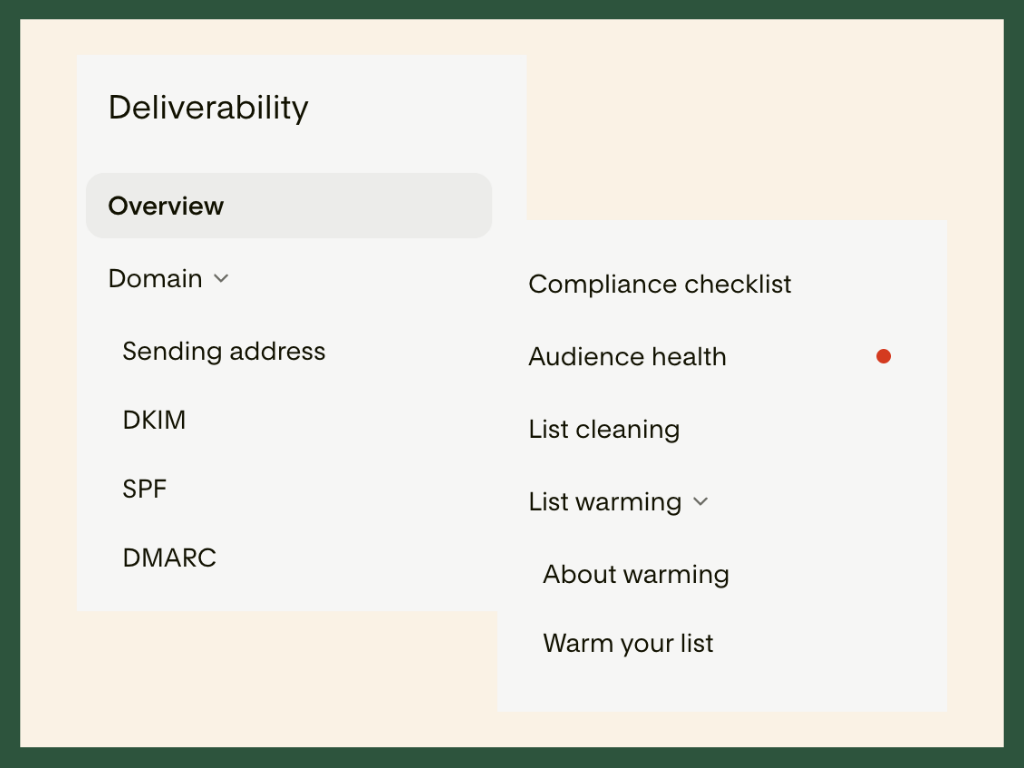
So what’s actually inside the new tab?
Let’s walk through each feature, what it tells you, and how to use it to protect your inbox placement.
Domain: Your foundation
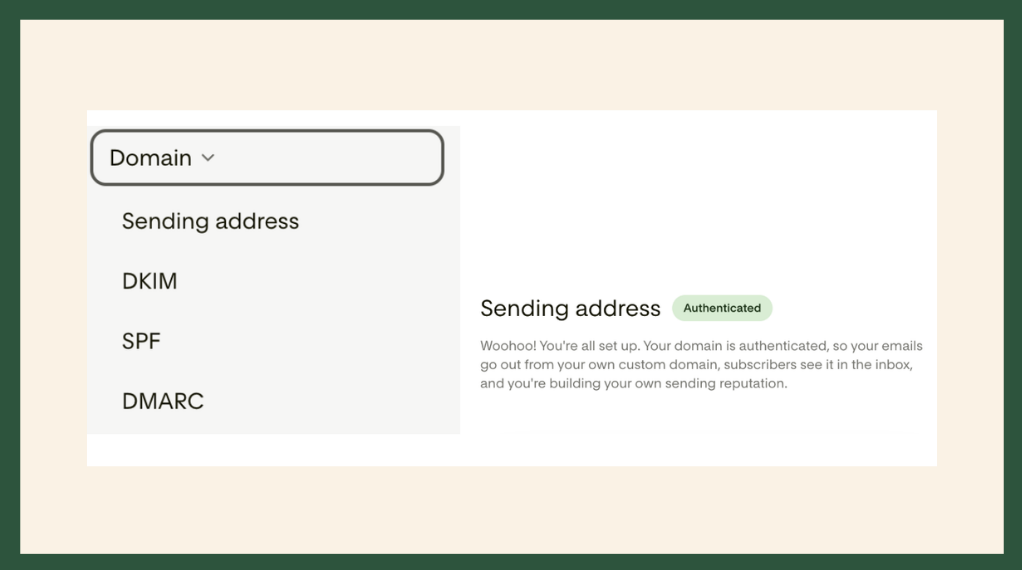
The Domain section walks you through authenticating your sending domain, and it’s where every Flodesk sender should start.
Authentication is how you prove to Gmail, Yahoo, Outlook, and other mailbox providers that you are who you say you are. Without it, your emails will land in spam or be blocked entirely, no matter how great your content is.
What I love about it: it’s simple.
Flodesk lists each record you need to add in your domain host (like GoDaddy, Squarespace, or Google Domains) and shows whether each one is verified. Once everything is set up correctly, you’ll see a green confirmation that your domain is authenticated and ready to send.
This may look like a small feature, but it’s the most important one in the tab, and also the most technical. DNS records can intimidate even experienced marketers and business owners, so having your email platform confirm “you did it right” removes a lot of guesswork.
A quick expert note: authentication gets you through the door, but it doesn’t guarantee the inbox. Think of it as your passport. You still need good sending habits to stay welcome, and that’s where the rest of this tab comes in.
Compliance Checklist: Flodesk’s side of the deal
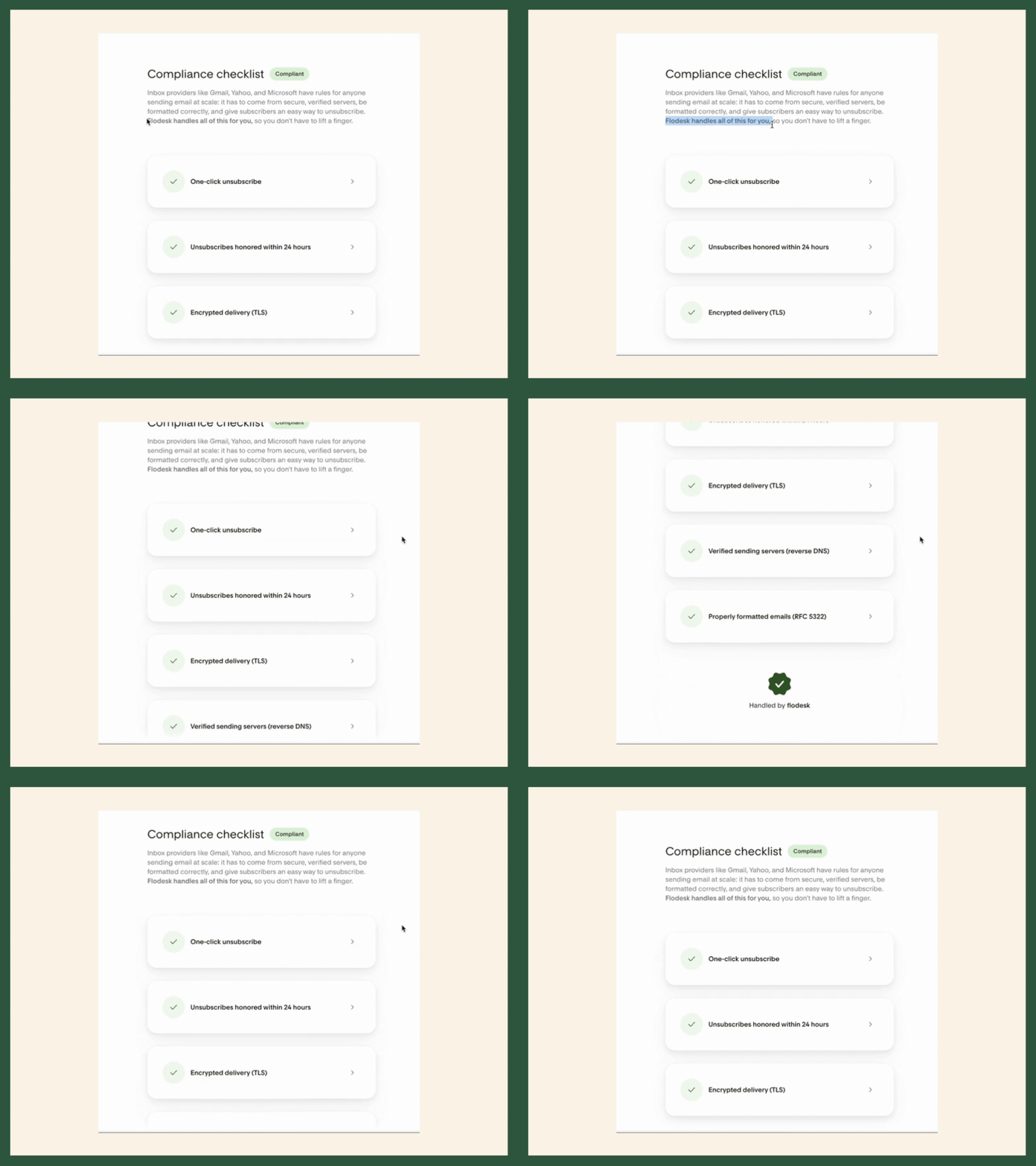
Mailbox providers don’t just hold senders accountable. They also set requirements for the platforms those senders use. The Compliance Checklist shows the mandatory items Flodesk handles behind the scenes so that it’s recognized as a safe, trustworthy sending platform.
If the Domain section is your proof of identity, think of this checklist as Flodesk’s.
What I love about it: it clears up whose job is whose.
When Gmail and Yahoo announced their new sender requirements in early 2024, many email marketers panicked. Features like one-click unsubscribe suddenly became mandatory, and it wasn’t clear whether senders had to set them up themselves or whether their email platform would handle them. (Short answer: some items fall on the platform, and others on you.)
This checklist removes the confusion. You can see at a glance which requirements Flodesk has covered, so you can stop worrying about them and focus on what’s in your control.
A quick expert note: one-click unsubscribe does not replace the unsubscribe link in your email. One-click unsubscribe usually appears as a button next to your sender name in the inbox. Your marketing emails still need a clearly visible unsubscribe link in the body, too. Mailbox providers require it, and so do anti-spam laws like CAN-SPAM.
Audience Health: Know who’s really listening
One of the hardest parts of any email program is seeing your list's true health. Your subscribers usually fall into three groups:
The engaged: they open, click, and buy.
The drifters: they open occasionally, but their interest is fading.
The inactive: they’re still subscribed, but they haven’t opened, clicked, or bought from you in a long time, if ever.
That last group is the most damaging to your sender reputation. Every email they ignore tells mailbox providers your content isn’t wanted, which can drag down inbox placement for everyone on your list, including your best customers.
With the Audience Health tab, you don’t have to guess who’s who anymore.
What I love about it: it measures both the quality of your audience and your content.
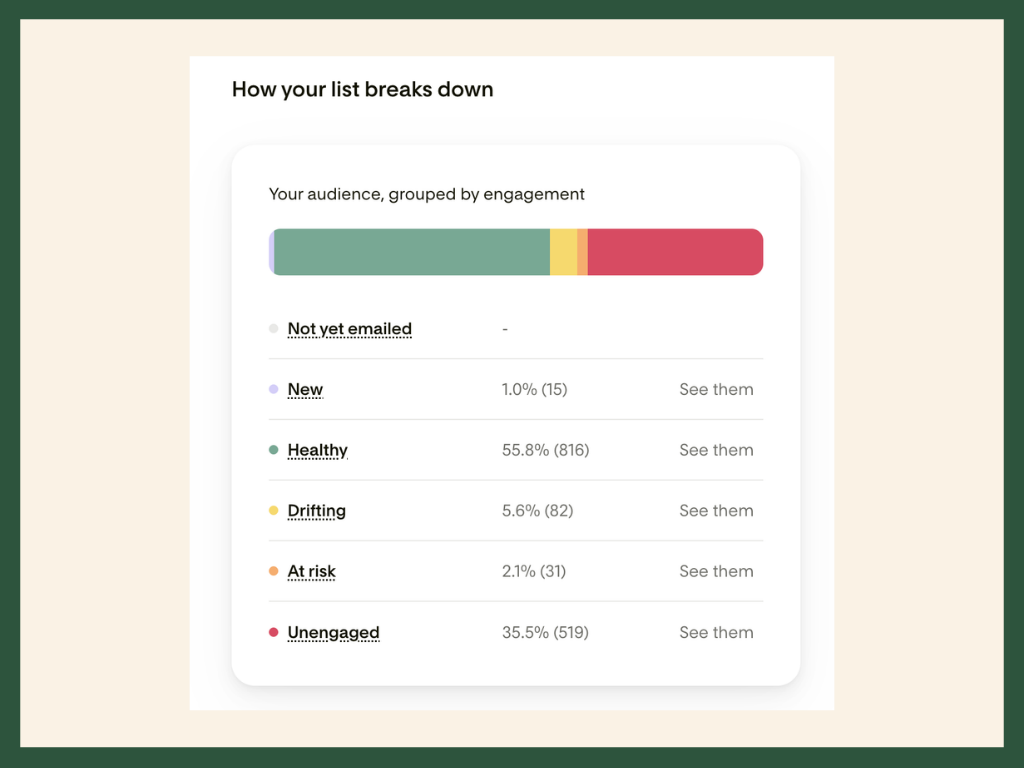
The tab breaks down your list by engagement, so you can see at a glance how many subscribers are thriving and how many are slipping away. (I’m a little obsessed with this view.) That breakdown gives you everything you need to build a strategy for each group.
By default, Flodesk considers a subscriber unengaged if they:
joined more than 180 days ago,
have received at least 6 emails, and
haven’t opened in the last 180 days.
That’s a solid starting point that I like to call the “ESPs guardrails”, but every business is different. If your customers take a year to buy, or decide within a few weeks, you can create a custom segment with a timeframe that fits your sales cycle.
The result is a clear picture of who to keep sending to, who to re-engage, and how often to email each group so your domain reputation stays healthy.
A quick expert note: Take open data with a grain of salt. Apple Mail Privacy Protection can mark emails as “opened” even when nobody read them, so some subscribers may look more engaged than they really are. Clicks, replies, and purchases are stronger signals of genuine interest.
List Cleaning: A quick and painless way to tidy up your list.
This feature lets you archive subscribers who haven’t engaged within a set timeframe. Archiving moves them out of your active subscribers segment, so you stop emailing people who aren’t paying attention. You can choose from three levels:
Light clean: unengaged for 180 days (your Unengaged segment)
Standard clean: unengaged for 120 days (your At Risk segment)
Deep clean: unengaged for 90 days (your Drifting segment)
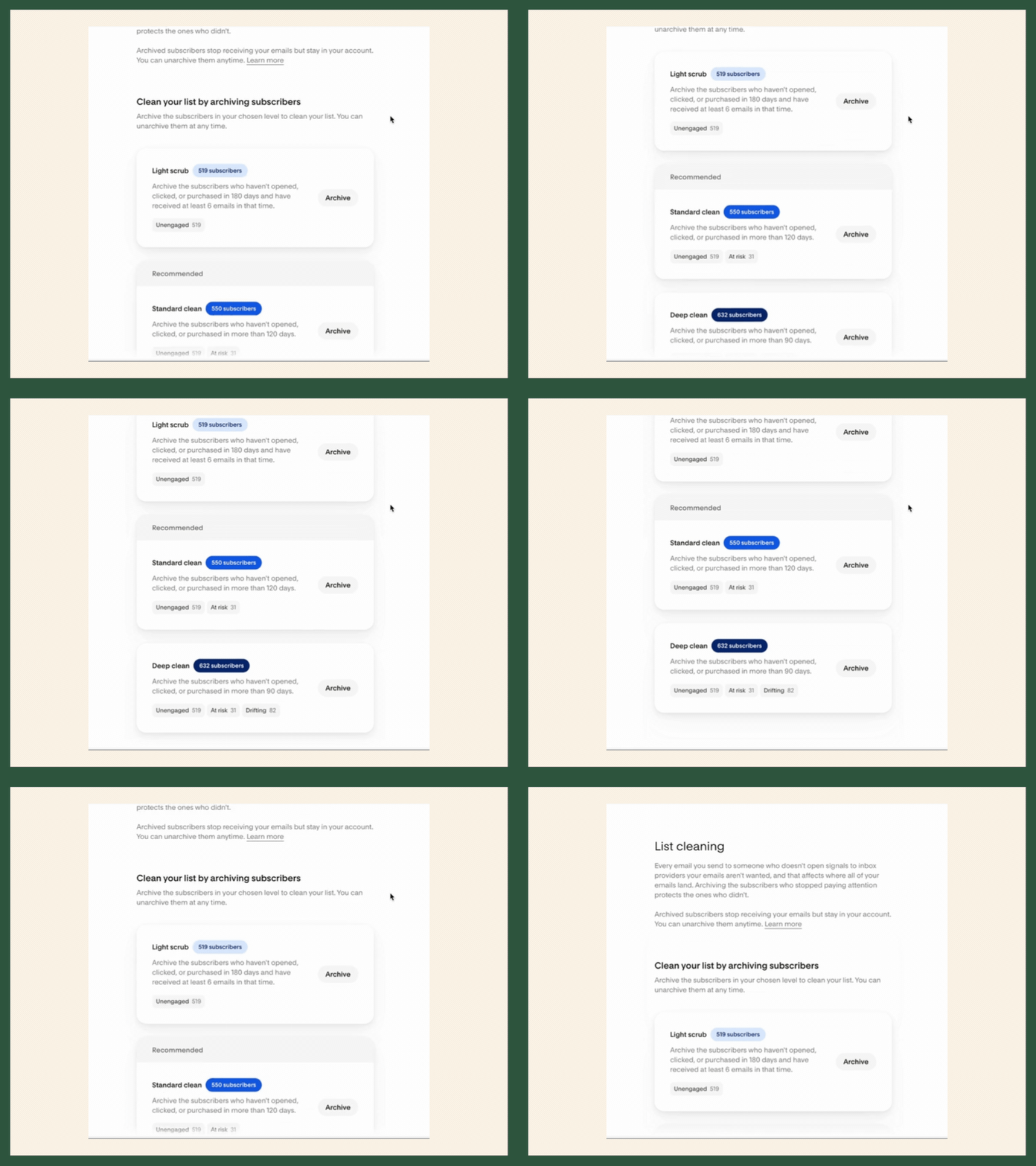
What I love about it: it makes the hard decision easier.
Most business owners already know they have unengaged subscribers. The hard part is deciding who really needs to go. You worked hard for every one of those signups, so letting them go can feel like throwing money away. I get it!
But holding on to people who never open your emails drags down your email health, and eventually it affects how many of your engaged subscribers see your emails in their inbox. Cleaning your list essentially protects the ones who want to hear from you.
A quick expert note: start with the Light clean. The 90-day Deep clean can catch people who are still interested, especially if you send infrequently or your customers take a while to buy. You can always move to a more aggressive level later.
And as I mentioned in the Audience Health section, give subscribers a chance to re-engage before you archive them. A short “Still want to hear from us?” email can win back a surprising number of people.
List Warming: Easing Back Into the Inbox
The final tab is List Warming, and it may be the one you lean on most when things go sideways.
First, a quick vocabulary lesson, since Flodesk uses “warming” to cover two terms you’ll hear a lot in deliverability:
Warming means gradually increasing how many emails you send, so mailbox providers can learn to trust you. You start small with your most engaged subscribers and build up over time.
Re-engagement means winning back subscribers whose interest has faded, before you decide whether to remove them.
This tab walks you through how to send when you:
are new to email marketing or new to Flodesk,
haven’t emailed your list in a while, or
have run into problems with spam complaints or bounces.
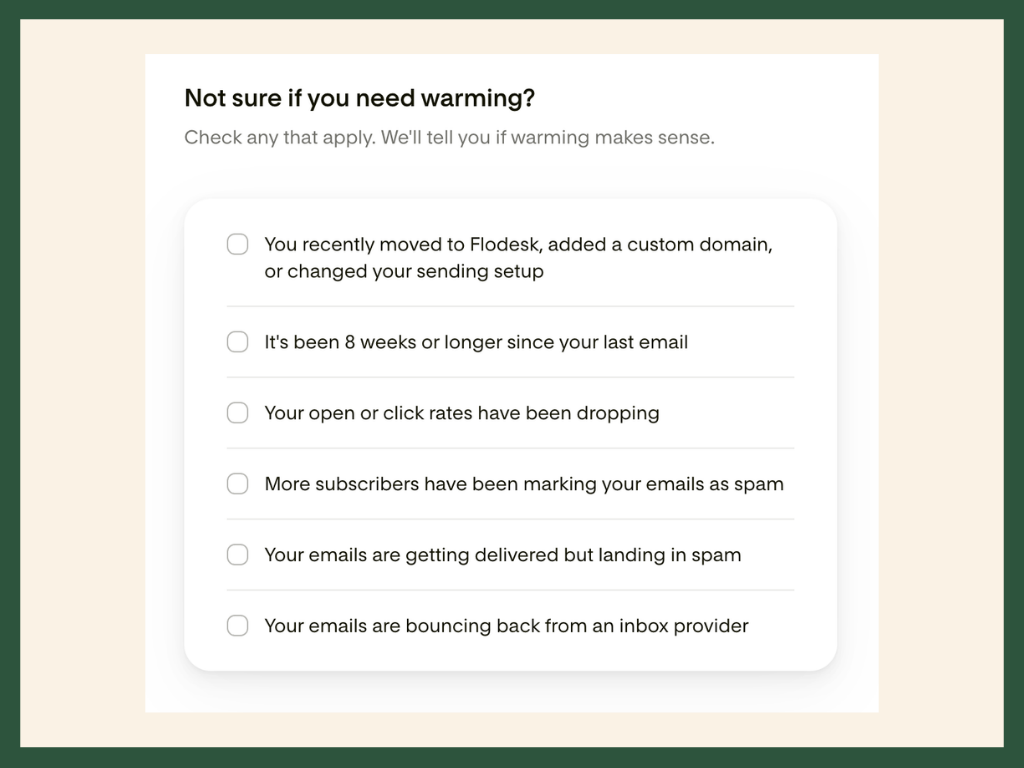
What I love about it: it recognizes that warming isn’t only for beginners.
There are plenty of reasons even seasoned senders need to slow down and rebuild. Maybe you’ve emailed consistently for years but just switched platforms. Moving to Flodesk means sending from new servers and a new shared IP pool, so mailbox providers need time to recognize your mail in its new home. Or maybe your content shifted, and engagement dropped sharply because your audience wasn’t expecting the change.
Whatever the cause, Flodesk gives you a solid starting point, and the List Warming tab makes the whole process feel seamless by pairing education with action. (Hey, Flodesk! You really did think of everything.)
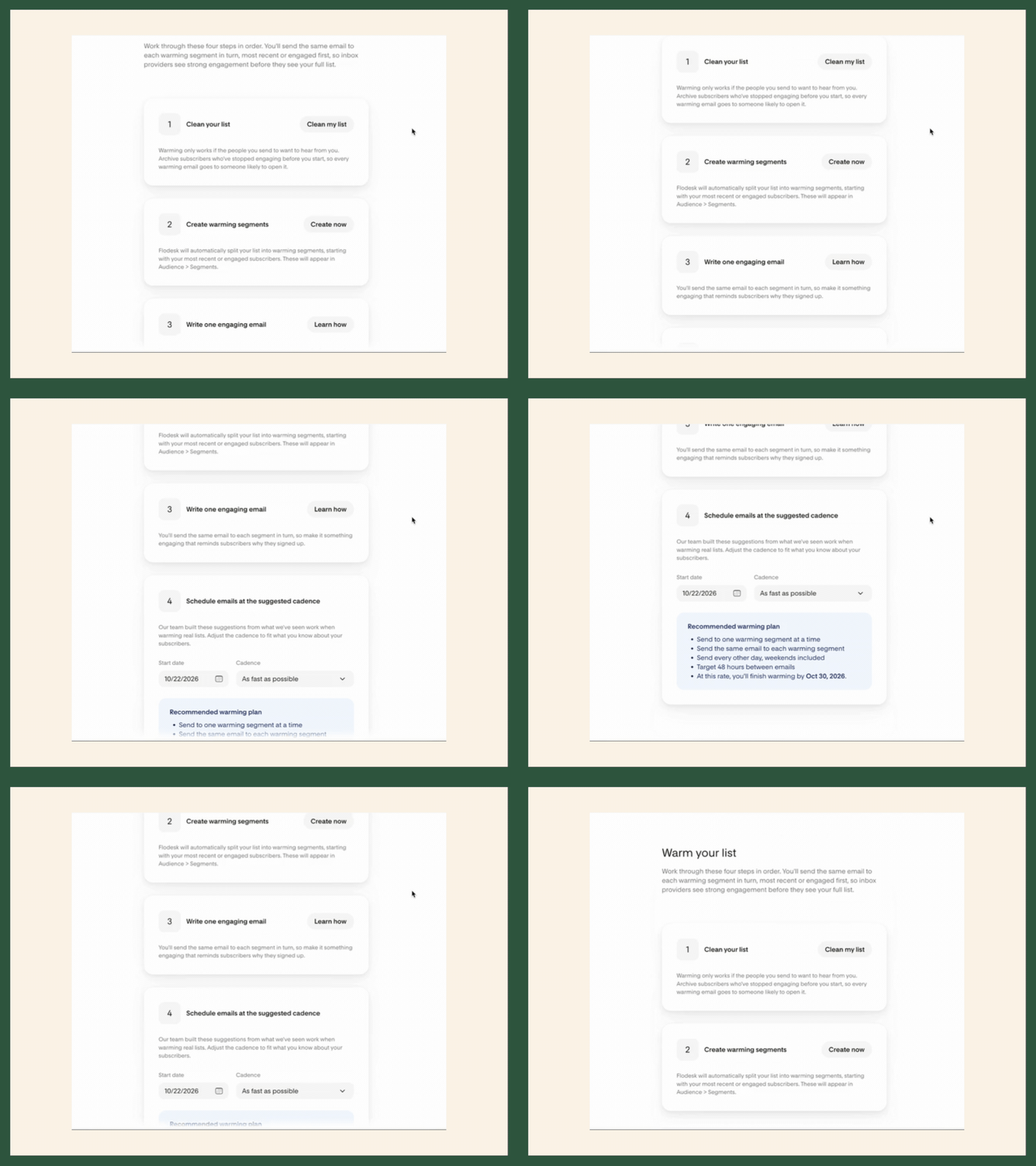
Flodesk has automated a lot of the heavy lifting that goes into warming, re-engaging, and repairing your email health. Need to clean your list, build your warm-up segment, or get guidance on writing a re-engagement email? You can do it all in a few clicks.
My favorite part is the warm-up timeline. As business owners and marketers, we’re always being asked to plan ahead. Knowing when your email program will be ready to run at full speed means you can map out launches, promotions, and campaigns with confidence instead of guessing.
Use this tab as your guide whenever you need to warm up or win back your audience.
The Bottom Line: Flodesk Is Investing in Your Inbox
When I first asked about deliverability tools earlier this year, I hoped for something useful. What Flodesk delivered is a thoughtful, beginner-friendly hub that covers both sides of deliverability:
The technical side: Domain authentication and the Compliance Checklist make sure you and Flodesk are meeting mailbox provider requirements.
The behavioral side: Audience Health, List Cleaning, and List Warming help you build the sending habits that keep you in the inbox.
That second part is what impresses me most. Plenty of platforms give you a place to add DNS records. Far fewer take the time to teach their customers why engagement matters and give them simple tools to act on it. Flodesk built a resource that helps small business owners protect one of their most valuable revenue channels.
And there’s more coming…
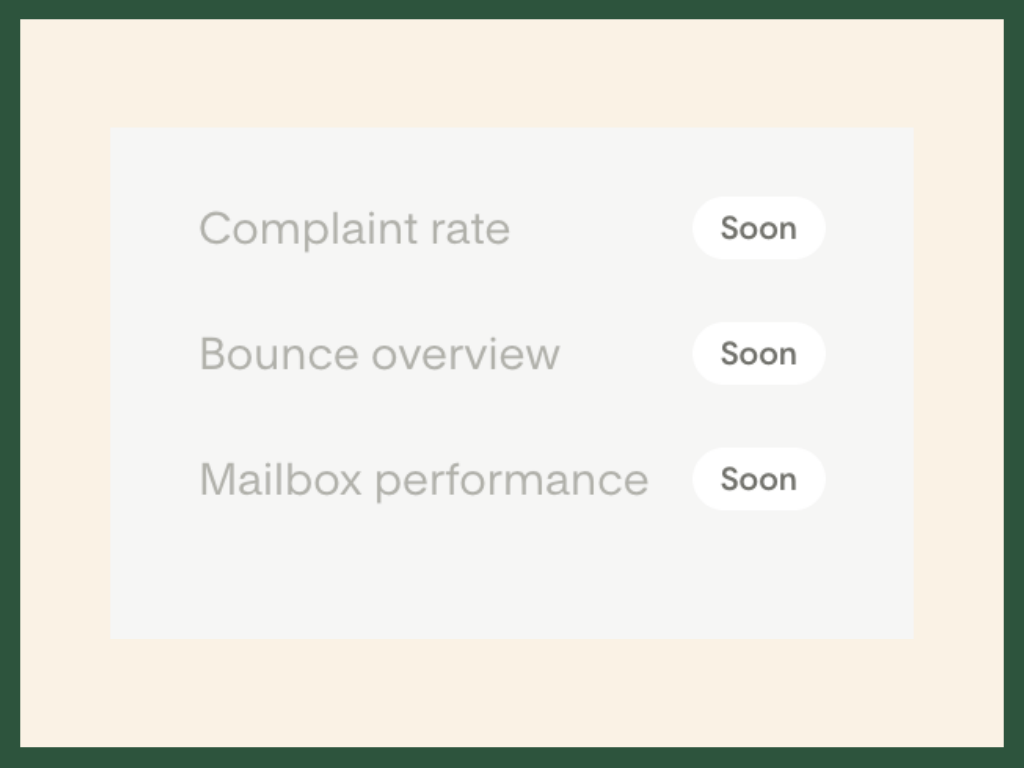
Flodesk is already working on new tabs for 2027, including complaint rates, bounces, and email performance. These are some of the exact metrics I check first when diagnosing deliverability problems, so having them in the same place as the rest of these tools will make it even easier to keep your email program in tip-top shape.
In the meantime, my advice is simple: open your Deliverability tab this week. Confirm your domain is authenticated, check how healthy your audience really is, and decide whether it’s time for a cleanup. Your engaged subscribers and the mailbox providers will thank you!
*Sponsored Content Disclosure: This post was created in paid partnership with Flodesk. All opinions are my own.